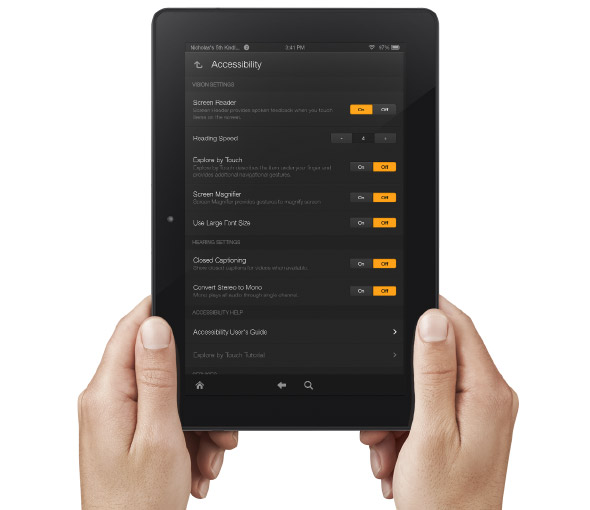
Amazon Improves Accessibility Features of Kindle Fire Tablets


Amazon's newly announced Kindle Fire HD and Kindle Fire HDX include built in accessibility features. Historically, Amazon has been slow to make their Kindle products accessible. With the new accessible Kindle Fire and accessible Kindle app for iOS Amazon maybe turning a new page. That being said, Amazon still doesn't want to make their Kindle eReaders accessible and has requested an exemption from the FCC.

The new Android based Kindle Fire tablets includes accessibility features for the blind, low vision, hearing impaired, and mobility impairments. For the blind and visually impaired the Kindle Fire includes a screen reader that can describe what is taking place on screen. There is also Explore by Touch which allows users to use gestures to navigate items one-by-one. For low vision users the new Kindle Fire tablets include a screen magnifier which is activated by a triple tap on the screen. There are also large font size and high contrast options to benefit low vision users. For users with mobility challenges the Kindle Fire can be controlled with a Bluetooth keyboard. For dyslexic users the Kindle Fire includes Immersion Reading which synchronizes the text and audio version of a book. With Immersion Reading the text is highlighted as a professional reader speaks. It is important to note that to use Immersion Reading you must own both the Audible audio version and the Kindle ebook version which can be costly. While it is very exciting to see Amazon improving their accessibility features other tablets such as the iPad include more robust accessibility features.

The Kindle Fires also include a "Mayday" button that allows you to connect with technical support at anytime. The support person can then help walk you through using different functions of your tablet. This "Mayday" button could be useful especially for new tablet users.

The Kindle Fire is available in 7 and 8.9 inch form factors both sizes are available in HD or more powerful HDX variety. The cost ranges from $139 to $229 depending on the size and features. Click here to purchase from Amazon. Click read more below to view a video about Immersion Reading.


Comments

Popular posts from this blog

Emergent Cloud Computing Business Models

The last year I wrote quite a few posts on the business models around SaaS and cloud computing including SaaS 2.0 , disruptive early stage cloud computing start-ups , and branding on the cloud . This year people have started asking me – well, we have seen PaaS, IaaS, and SaaS but what do you think are some of the emergent cloud computing business models that are likely to go mainstream in coming years. I spent some time thinking about it and here they are: Computing arbitrage: I have seen quite a few impressive business models around broadband bandwidth arbitrage where companies such as broadband.com buys bandwidth at Costco-style wholesale rate and resells it to the companies to meet their specific needs. PeekFon solved the problem of expensive roaming for the consumers in Eurpoe by buying data bandwidth in bulk and slice-it-and-dice-it to sell it to the customers. They could negotiate with the operators to buy data bandwidth in bulk because they made a conscious decision not to st...

Focus On Your Customers And Not Competitors

A lorry is a symbol of Indian logistics and the person who is posing against it is about to rethink infrastructure and logistics in India. Jeff Bezos is enjoying his trip to India charting Amazon’s growth plan where competitors like Flipkart have been aggressively growing and have satisfied customer base. This is not the first time Bezos has been to India and he seems to understand Indian market far better than many CEOs of American companies. His interview with a leading Indian publication didn’t get much attention in the US where he discusses Amazon’s growth strategy in India. When asked whether he is in panic mode: For 19 years we have succeeded by staying heads down, focused on our customers. For better or for worse, we spend very little time looking at our competitors. It is better to stay focused on customers as they are the ones paying for your services. Competitors are never going to give you any money. I always believe in focusing on customers, especially on their latent unme...

Google's Advance Voice Search Comes to Chrome

Recently Google added advanced voice search to the Chrome browser . Google's advance voice search feature was previously only available for Android and iOS , but is now available on Mac and Windows . The feature is similar to Apple's Siri ,but works on your computer as well as mobile devices. To access the feature, navigate to Google using the Chrome browser and press the microphone icon to the right of the search bar. Then you can search by voice and Google will speak back select results. I have found the voice recognition to be very fast and accurate. One of the most notable features for struggling spellers is that you can ask how to spell a word and then Google will speak back the correct spelling. Google will also provide spoken responses for many other queries as well. Watch the above video to learn more.